How to track someone else's flight
Updated
Someone you care about is flying and you want to know where they are. Maybe you are picking them up, maybe you just want to know they landed safely. This guide explains what information you need, where to look and how to read what you find.
The information you need
To track a flight reliably you need two things: the flight number and the date of departure. Everything else, such as the airports and the scheduled times, you can look up from those two.
A flight number has two parts: an airline code and a number. KL1001 is a KLM flight, BA286 is a British Airways flight and UA900 is a United flight. The airline code is usually two characters, sometimes followed by a space. Tracking websites also accept the three letter version of the code, for example KLM1001.
The date matters because most flight numbers operate every day. KL1001 on Monday and KL1001 on Tuesday are two different flights with their own delays. Always use the date of departure in the local time of the departure airport. A late evening flight from New York is already the next day in Europe, which is a common source of confusion.
Where to find the flight number
The easiest way is to ask the traveler. It is on their boarding pass, their booking confirmation email and in their airline app. Ask for a screenshot of the confirmation if you want to be sure, because it also shows the times and any connections.
If you cannot reach the traveler, you can often find the flight by route and time. Airport websites have arrivals boards that list every flight for the day with the origin city and scheduled time. If you know they come from Lisbon and land around 3 PM, the list is usually short.
Be careful with codeshares. One physical flight can be sold under several flight numbers by partner airlines. The traveler's booking might show a Delta number while the flight is operated by Air France. Trackers normally recognise both numbers, but the airport board may only show the operating airline's number.
Where to see the live status
There are four common places to follow a flight:
- The airline's website or app, which has a flight status page. This is the official source for delays, gates and cancellations.
- The arrival airport's website, which shows the arrivals board, the expected time and sometimes the baggage belt.
- A public flight tracking website, which shows the aircraft on a live map with its speed, altitude and estimated arrival.
- A link from the traveler, such as a FlightMessenger tracking page, which shows the status of their exact flight without any searching.
If the traveler sends you a link, use it. It is already set to the right flight and date, so you cannot pick the wrong day or the wrong codeshare.
How to read the flight status
Status pages use a small set of words. Here is what they usually mean:
- Scheduled: the flight is planned and has not departed yet. There is no known delay.
- Delayed: the airline expects the flight to leave or arrive later than planned. Look for the new estimated time.
- Departed or airborne: the aircraft has left the gate or taken off.
- Landed: the aircraft has touched down. The traveler is not in the arrivals hall yet.
- Cancelled: the flight will not operate. The traveler will be rebooked on another flight, often with a new flight number.
- Diverted: the flight landed at a different airport than planned, for example because of weather or a medical emergency.
Pay attention to the difference between scheduled, estimated and actual times. The scheduled time is the plan in the timetable. The estimated time is the current prediction, which changes during the day. The actual time is what really happened. An arrival 20 minutes after the scheduled time can still count as on time on some airline pages, so look at the estimated time, not only the label.
Which time zone are the times in?
Airline and airport pages show times in the local time of each airport. Departure is in the departure city's time, arrival is in the arrival city's time. Flight trackers are less consistent: some use local airport time, some use your own time and some use UTC.
If the traveler is in another country, check which time zone you are looking at before you plan anything. The FlightMessenger tracking page shows times in your own timezone by default and lets you switch to another one, so you always know which clock the times refer to. Our guide to local arrival times explains how to convert them yourself.
Track the flight with a FlightMessenger link
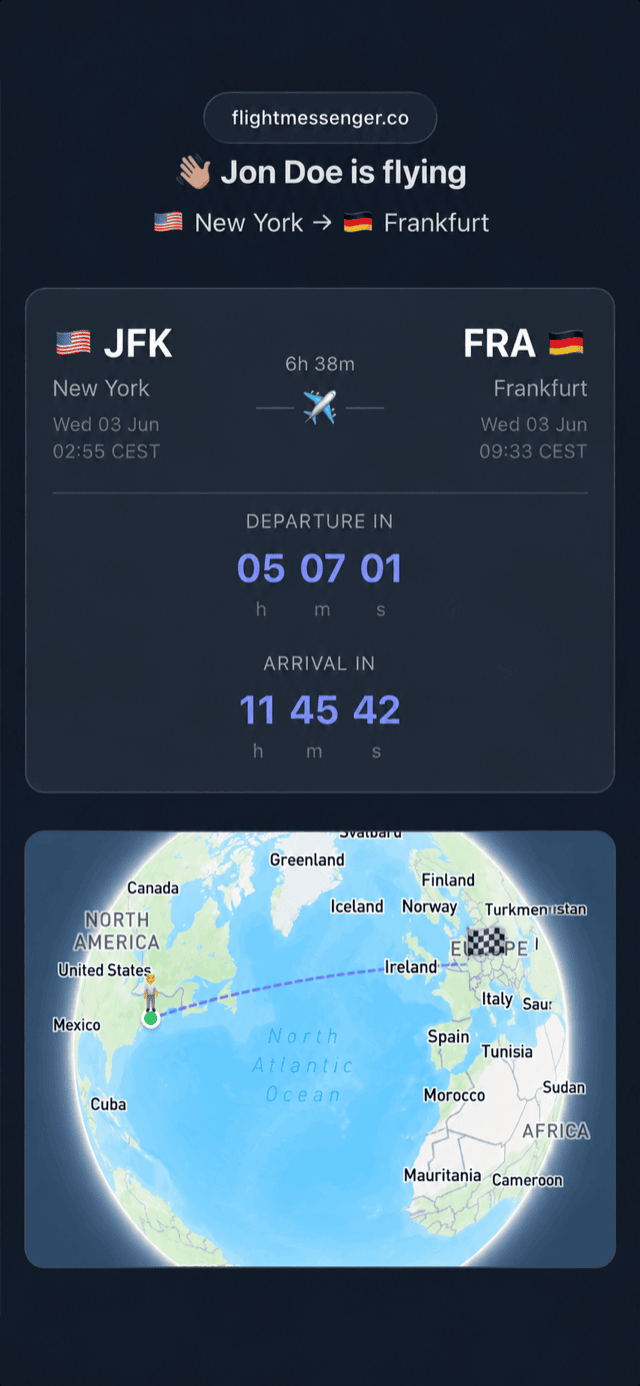
If the traveler uses FlightMessenger, you get a message with the flight details and a link to a live tracking page. You do not need an account or an app. The page shows:
- The current status, with delays shown next to the departure and arrival times
- A countdown to takeoff and a countdown to landing
- The aircraft's progress along the route on a 3D globe
- Every leg of the trip if the traveler has a connection
- When the live data was last updated
Keep the page open or bookmark it. It updates itself, so you do not have to search again later.
Common mistakes to avoid
Most tracking problems come from a few simple errors. Checking the wrong date is the most common one, especially for overnight flights. Tracking the first leg of a trip and forgetting the connection is the second. Reading the landing time as the time the traveler walks out is the third: after landing, the aircraft still needs to taxi to the gate, and the traveler may need to pass passport control and collect bags.
If something looks wrong, for example the flight shows as landed hours before it should, check the date and the flight number with the traveler. When in doubt, the airline's own status page is the most reliable source for delays and cancellations.
Make it easy next time
If you often wait for the same person, ask them to send you the flight number and date as soon as they book, or to share a tracking link before they leave for the airport. It takes them a minute and saves you from searching arrivals boards later.