How to share your flight status with family
Updated
Your family wants to know three things when you fly: when you leave, whether you are on time and when you land. There are several ways to give them that information. This guide compares the most common options and shows you how to set each one up.
What your family actually wants to know
Before you choose a method, think about what the people at home will do with the information. A partner who drives to the airport needs the arrival time and any delay. A parent who worries needs to know that you took off and that you landed safely. A colleague who plans a meeting needs the time you can realistically be in the city.
A good flight update answers these questions without the reader having to ask you. It includes:
- The flight number, airline and date
- The departure and arrival airports
- Departure and arrival times, clearly marked as local times
- The current status: on time, delayed, in the air, landed or cancelled
- A way to check for changes without messaging you
The last point is the one most people forget. If your family can check the status themselves, you do not have to send updates from a boarding queue or a taxiing aircraft.
Option 1: Share from the airline app
Many airlines let you share trip details from their app or website. Some send a link to a page with your flight status, others let you add a contact who gets text or email alerts about delays and gate changes.
This works well when everyone on your list is comfortable with the airline's system and you fly the same airline often. The downsides are that every airline does it differently, some features only work for the person who made the booking, and connecting flights on partner airlines often do not show up at all. If you fly with three different airlines in a year, your family has to learn three different systems.
Option 2: Send a flight tracker link
Public flight tracking websites show the live position and status of most commercial flights. You can search for your flight number and send the link to your family.
Trackers are accurate and detailed, but they are made for aviation fans. The page is full of data such as altitude, ground speed and aircraft registration, and times are often shown in UTC or in the viewer's own timezone without a clear label. Many trackers also push visitors to install their app or to pay for a subscription, and a link to a flight number can show the wrong day if the same flight number operates daily.
Option 3: Share your live location
Phone location sharing shows where you are on a map. It is useful on the ground, for example when someone is waiting at arrivals and wants to see when you leave the terminal.
In the air it is much less useful. Most phones are in flight mode or without signal during the flight, so your family sees your last known position at the departure airport for hours. Location sharing also does not show delays, gates or an expected arrival time, and many people do not want to share their exact location for a whole trip.
Option 4: Send a FlightMessenger update
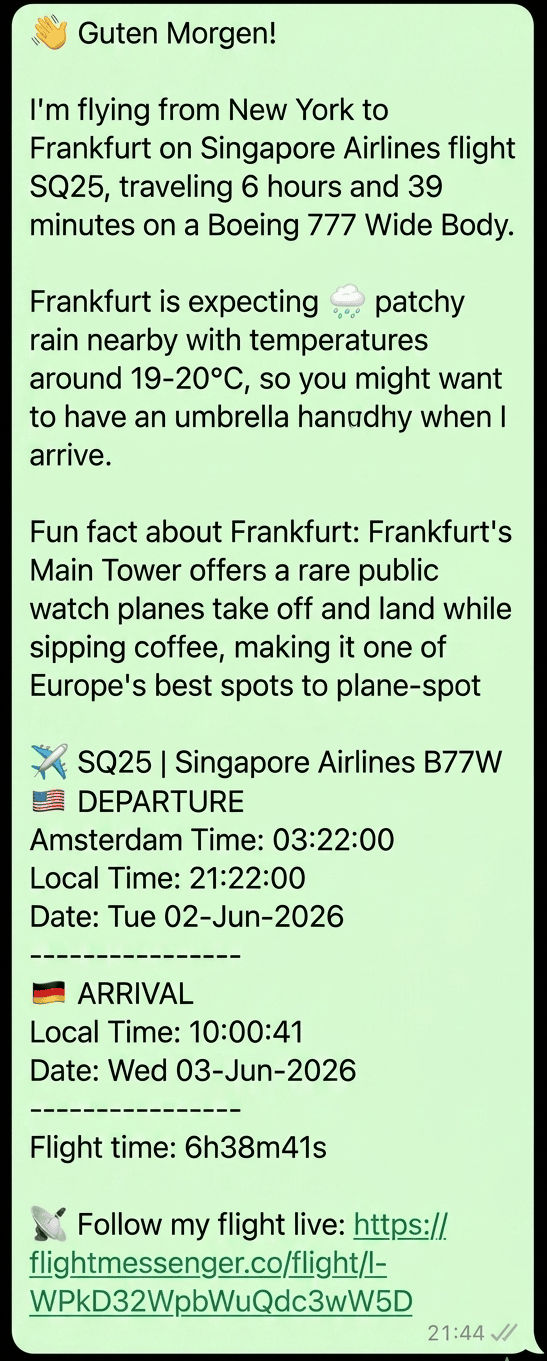
FlightMessenger was built for exactly this job. You add your flight number and date, and it writes a clear message with the route, airline, aircraft and departure and arrival times in local time. You can add the current weather at your destination, a fun fact about the place you are going and a link to a live tracking page.
You send the message yourself, through WhatsApp, iMessage, email, SMS or any other app your family already uses. The live page opens in any browser, without an account, and shows the status, delays, a countdown to takeoff and landing and the aircraft's progress on a globe.
How the options compare
Each method has a place. Use this summary to choose:
- Airline app: good for one airline, limited for connections and mixed itineraries.
- Flight tracker link: detailed and live, but crowded and easy to misread for non-experts.
- Location sharing: good on the ground, not reliable in the air, and more personal data than most trips need.
- FlightMessenger: one readable message plus a live page, works with any airline, nothing for your family to install.
Step by step: share your flight with FlightMessenger
- Create a free account at flightmessenger.co. You only need an email address.
- Add a flight with the flight number, for example KL1001 or BA286, and the date you fly.
- Choose what to include: destination weather, a fun fact and the live tracking link.
- Copy the message and paste it into the chat with your family, or send it to several people at once.
- If you add the flight more than a day ahead, you get an email with a refreshed message about 12 hours before departure. Send that one too, so the details are current.
That is all. Your family can open the tracking page as often as they like, and you do not have to send another update until you land.
When to send your update
Timing matters more than most travelers expect. A message sent a week ahead is often out of date by the day of travel, because airlines change schedules and aircraft. A message sent from the gate can arrive when your family is asleep or at work.
A good rhythm is one message the day before, with the final times and the tracking link, and one short message when you land. If there is a significant delay before departure, send a short note with the new expected time. Your family can then follow the rest on the live page.
Tips for connecting flights
If your trip has a connection, share every leg, not only the first one. A delay on the first flight can mean a missed connection, and your family then needs to know the new flight number. Add each flight separately in FlightMessenger so every leg has its own times and status.
Tell your family the final arrival time, not the time you land at the connection airport. People often confuse the two and go to the airport hours too early. When you rebook after a missed connection, send the new flight number as soon as you have it, even before you have a seat assignment.
Keep it simple for the people at home
The best method is the one your family can use without help. If your parents struggle with apps, a link that opens in the browser is better than any feature list. If your partner checks their phone only in the evening, one clear message is better than ten automatic alerts.
Whatever you choose, test it once on a short trip. Ask the people at home if the message was clear and if they could follow the flight. Then use the same method every time, so they know what to expect.