Flight delayed and someone is picking you up? Here is what to do
Updated
A delay is annoying for you, but it is often worse for the person who drives to the airport. They wait in a car park, pay for parking and check their phone every five minutes. With a little planning you can make the wait much shorter for them.
First, understand the delay
Not every delay at departure means the same delay at arrival. Airlines build some extra time into their schedules, and pilots can sometimes fly a faster route or get a shorter approach. A 30 minute departure delay often becomes a 15 minute arrival delay. On the other hand, a flight that leaves on time can still arrive late because of a queue for the runway or a busy arrival airport.
So the number that matters for your pickup is the estimated arrival time, not the departure delay. Check it on the airline's status page or your tracking link before you send any update.
Tell your pickup quickly and clearly
As soon as you know about a delay, send one short message. Include:
- The new estimated arrival time, in the local time of the arrival airport
- The reason, if you know it, because a technical problem can grow while a late incoming aircraft usually does not
- Whether you have checked bags
- When you will send the next update, for example when you board
Avoid vague messages such as "running late, will let you know". Your pickup then cannot decide anything, and they will message you again when you are trying to board.
Let them follow the flight themselves
The best way to avoid a stream of messages is to give your pickup a live source. Send them the flight number and date, or a tracking link, before you leave for the airport. Then they can check the estimated arrival time whenever they want.
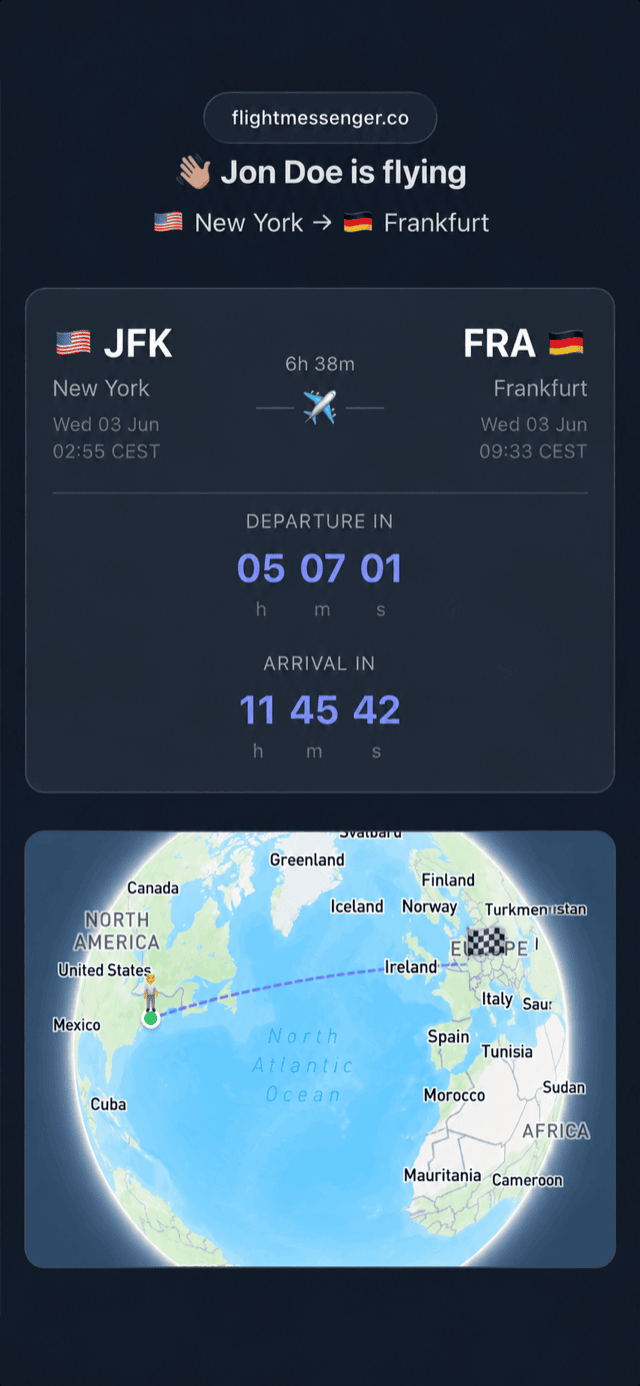
A FlightMessenger tracking page shows the new times with the delay next to them, and a countdown to takeoff and landing. It opens in any browser, so it also works for a parent or friend who does not use flight tracking apps. When the aircraft is in the air, the page shows its progress along the route, so your pickup can see how far away you are.
When should your pickup leave home?
A simple rule: your pickup should not leave home until your flight has actually departed. Before takeoff, a delay can still grow or the flight can be cancelled. After takeoff, the estimated arrival time is usually accurate to within 15 to 20 minutes.
They should then plan to arrive at the airport a little after the estimated landing time, not before it. The time between landing and walking out of the arrivals hall is almost always longer than people expect.
How long arrivals really takes
Landing is only the start. After touchdown the aircraft taxis to the gate or a remote stand, the doors open and passengers leave row by row. Then come passport control, baggage and customs. Typical times from landing to the arrivals hall are:
- Domestic flight, hand luggage only: 15 to 30 minutes
- Domestic flight, checked bags: 30 to 50 minutes
- International flight, hand luggage only: 30 to 60 minutes
- International flight, checked bags: 45 to 90 minutes, sometimes more at busy hubs
These are rough figures. Large airports with long walks, bus transfers from remote stands or long passport queues can add much more. Tell your pickup which situation applies to you, and send a message when you have your bags.
Save money on parking
Many airports have a free or cheap waiting area near the terminal, sometimes called a cell phone lot. Your pickup can wait there until you message them from the arrivals hall or the curb. This avoids expensive short stay parking and stress about waiting times at the drop off zone.
Agree on the meeting point before your flight, not after you land. "Door 3 of arrivals" or "the pickup lane outside Terminal 2" is much easier to find than a spot you try to describe while your phone reconnects to the network.
When the delay gets worse
Some delays keep growing. If your flight is delayed by several hours, tell your pickup to stay at home and wait for the next update. If the flight is cancelled, you will be rebooked on a new flight with a new flight number, sometimes the next day. Send the new flight number and date as soon as you have them, so your pickup can track the right flight.
If you miss a connection, the same applies. Your original second flight will still show on trackers and may land on time without you. Make sure the people at home know which flight you are really on.
A quick checklist
- Before you travel, send your pickup the flight number, date and a tracking link.
- Agree on a meeting point and whether they wait in a car park or a waiting area.
- If there is a delay, send the new estimated arrival time and whether you have checked bags.
- Your pickup leaves home only after your flight has departed.
- Message them when you have your bags or when you walk out of customs.
How FlightMessenger helps
With FlightMessenger you set this up once. Add your flight number and date, and you get a clear message with local times and a live tracking link to send to whoever is picking you up. If you add the flight in advance, you get a refreshed message by email about 12 hours before departure, with the latest times. After that, your pickup can check the live page instead of waiting for your messages.