How to share a flight tracker link that needs no app
Updated
You want your family to follow your flight, but you do not want to talk your parents through installing an app, creating an account and turning on notifications. A link that opens in a web browser solves this. This guide explains why, and what a good tracking link should show.
Why apps get in the way
Flight tracking apps are made for the person who flies, or for aviation fans. For the people at home they add work at the wrong moment. To follow one flight, a family member has to:
- Find the right app in the app store and install it
- Create an account or skip past a sign up screen
- Accept or refuse notification and tracking permissions
- Search for the flight and pick the right date
- Close prompts to upgrade to a paid plan
Each of these steps is small, but together they mean that many people give up and send you a message instead. Older relatives, people with a full phone and people who use a work phone with restricted app installs have the most trouble.
What a browser link does better
A link works on every phone, tablet and computer with a web browser. Your family taps it in the message you sent and sees the flight immediately. Nothing to install, nothing to sign up for and nothing to search.
A link is also tied to one specific flight. It already knows the flight number, the date and every leg of the trip, so nobody can accidentally follow yesterday's flight with the same number. When the trip is over, there is nothing left on their phone to uninstall.
What a good tracking link should show
Not every link is equally useful. Before you rely on one, check that it gives the people at home what they need:
- Clear status words such as scheduled, delayed, in the air, landed or cancelled
- Departure and arrival times with a clear time zone, and the delay next to each time
- A countdown to takeoff and landing, which is easier to understand than a clock time
- The aircraft's position or progress, so it is clear the flight is moving
- Every leg of a trip with a connection, not only the first flight
- Automatic updates, so the page stays current without searching again
- A layout that is easy to read on a phone
Links from general flight trackers often show the map and the raw data, but not the countdowns, the connections or a clear time zone label. Airline status links are accurate but usually limited to that airline's own flights.
Flight links and privacy
A flight tracking link shares information about a flight, not about you. It does not show your seat, your booking reference or where you are after you land. That is a big difference from live location sharing, which shows your exact position for as long as it is switched on.
Still, treat a tracking link like any other personal information. Send it to the people who need it, in a private chat, instead of posting it publicly. Never share a photo of your boarding pass: the barcode contains your booking reference, which someone could use to change or cancel your booking.
How to send a no app link with FlightMessenger
- Create a free FlightMessenger account in your browser.
- Add your flight number and the date you fly. If you have a connection, add each flight.
- Turn on the live tracking link option for your message.
- Copy the message and send it through WhatsApp, iMessage, SMS, email or any other app.
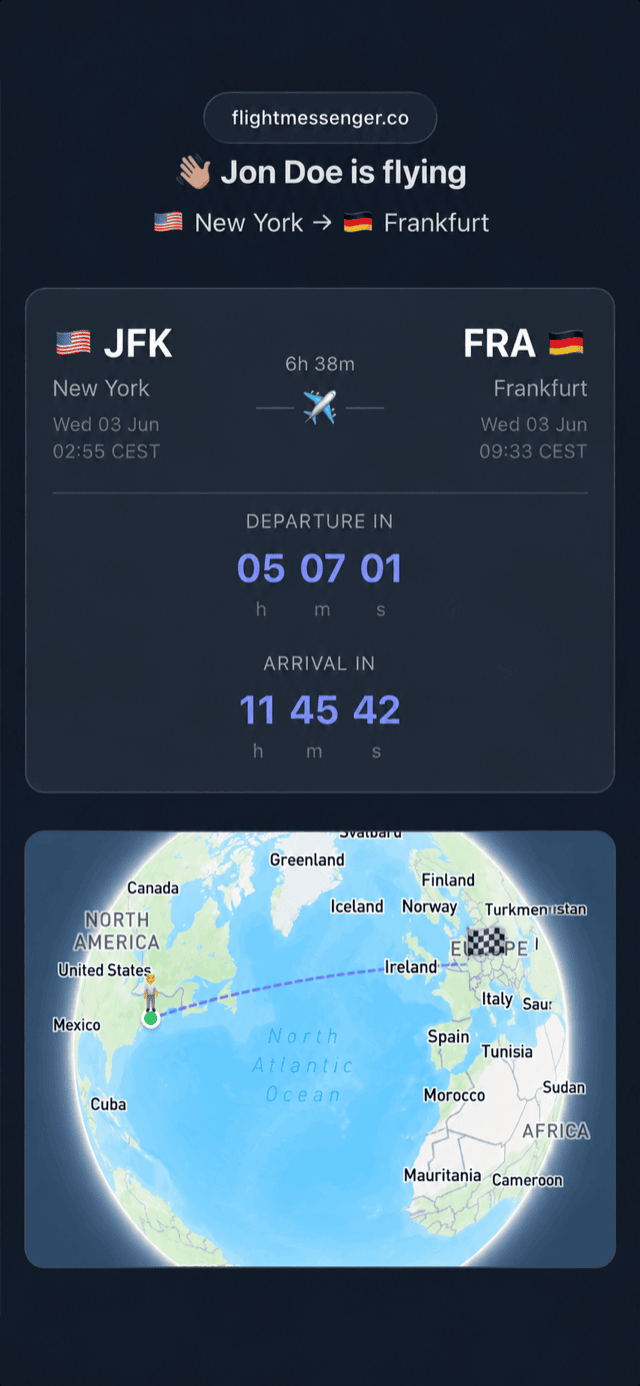
The people who get your message tap the link and see a live page with the status, delays, countdowns and your route on a 3D globe. They do not need an account, and there is no limit on the number of people who can open it.
Tips for sharing the link
Send the link before you leave for the airport, not from the aircraft. Once you are in flight mode, you cannot answer questions about how it works. A short line such as "Tap this link to follow my flight, no app needed" helps people who are careful about opening links.
If you share the link in a group chat, pin the message so it is easy to find later. Recipients can also save the page to their home screen or bookmarks if they want to check it often.
What a link cannot do
To be clear about the limits: a tracking link needs an internet connection to update, and the data comes from flight data providers, so small regional flights sometimes have less live information than large airline flights. A tracking page also cannot tell your family when you walk out of the arrivals hall. Send a short message when you have your bags, so they know you are really on your way.
The easiest option for everyone
For the traveler, a link means one message instead of many. For the people at home, it means one tap instead of an app, an account and a search. That is why a browser link is the simplest way to let family and friends follow your flight, whatever phone they use.